How to Check If AI Crawlers Can Actually Reach Your Site
By Abdul SubkhanPublished
Part of AI SEO, GEO and AEO
Images in this guide are free to reuse (CC BY 4.0). Credit CiteVantage with a link to this page.
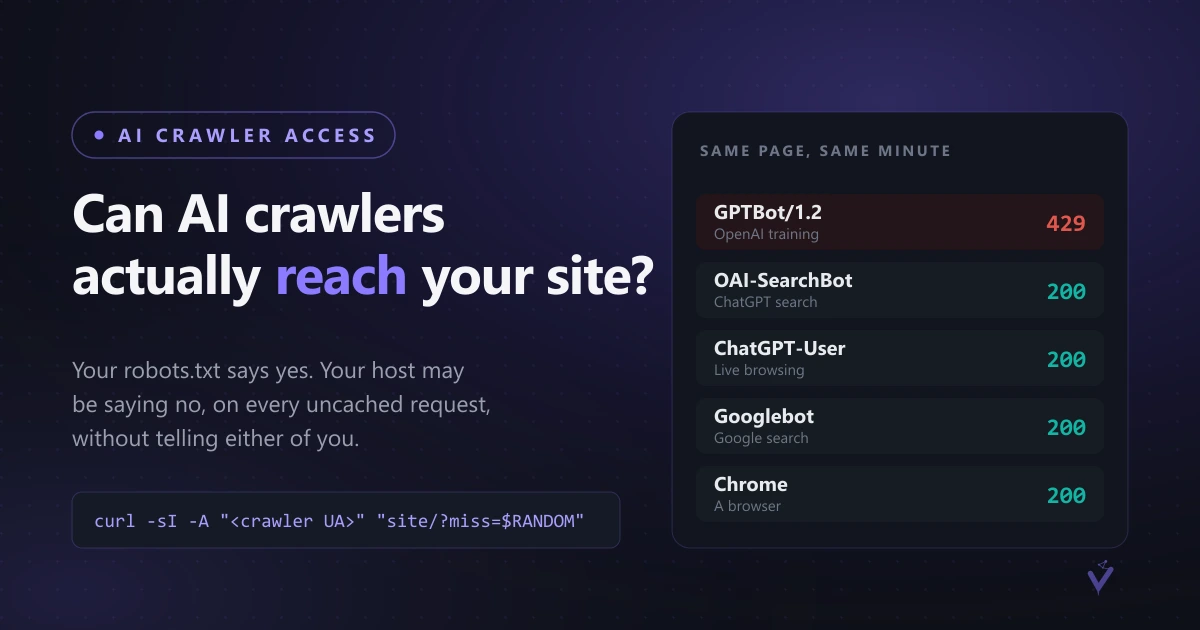
“Can AI crawlers reach my site” has two different answers, and almost everyone only ever checks the first one. Your robots.txt can welcome every crawler in existence while your host quietly refuses them at the door. The permission you publish and the response your server actually returns are not the same thing.
We found this on our own site. OpenAI’s training crawler, GPTBot, was getting HTTP 429 on every request that was not already cached. Our host later confirmed in writing that the rule is deliberate, applies across their whole platform, and cannot be turned off on a shared plan. Nothing in our configuration caused it, nothing in our logs showed it, and the site looked perfect in a browser.
Here is how to find out whether the same thing is happening to you, in about five minutes.
The test: can AI crawlers reach your site right now?
Four requests. Same machine, same minute, same page. The only thing that changes is who you say you are.
# 1. GPTBot, full versioned string, cache-busted
curl -sI -A "Mozilla/5.0 AppleWebKit/537.36 (KHTML, like Gecko); compatible; GPTBot/1.2; +https://openai.com/gptbot" \
  "https://YOURSITE.com/?miss=$RANDOM" | head -n 1

# 2. Control: an ordinary browser
curl -sI -A "Mozilla/5.0 (Windows NT 10.0; Win64; x64) Chrome/139.0" \
  "https://YOURSITE.com/?miss=$RANDOM" | head -n 1

# 3. Control: OpenAI's other crawler, the one behind ChatGPT search
curl -sI -A "Mozilla/5.0 AppleWebKit/537.36 (KHTML, like Gecko); compatible; OAI-SearchBot/1.0; +https://openai.com/searchbot" \
  "https://YOURSITE.com/?miss=$RANDOM" | head -n 1

# 4. Control: Googlebot
curl -sI -A "Mozilla/5.0 (compatible; Googlebot/2.1; +http://www.google.com/bot.html)" \
  "https://YOURSITE.com/?miss=$RANDOM" | head -n 1
If all four return 200, you are fine. If one crawler returns 429 or 403 while the browser returns 200, the refusal is keyed to that user-agent string and it is happening somewhere between you and the crawler.
Three ways this AI crawler access test goes wrong
Forgetting the random query string. Without ?miss=$RANDOM you are asking the CDN for a page it already has, and it will hand over the cached copy without ever consulting the rule that would refuse it. You will get a clean 200 and learn nothing. The cache-buster is the entire test.
Testing in a burst. This one caught us. We fired 78 rapid requests as GPTBot and 34 came back refused, which looked like a partial block. Repeating the same URLs one every twenty seconds, four of six returned 200. A rate limit punishes exactly the behaviour a fast test performs, so a burst measures your test rather than your site. Space the requests out.
Trusting one result. Answers vary. Run each identity about ten times with gaps before you believe either outcome.
What the response headers tell you
When a request is refused, read the headers rather than guessing:
curl -sI -A "<the crawler UA>" "https://YOURSITE.com/?miss=$RANDOM"A Server value naming a CDN, a request ID, and no cache status together mean the edge refused the request before your own server was involved. That distinction matters, because it tells you no amount of editing your site will fix it.
The fix you control: warm your own cache
If the refusal is at your host’s edge, you cannot remove it. What you can do is make sure your pages are already cached when a crawler arrives, because a cached response is served without consulting the rule.
The trap is that most deploy processes purge the CDN cache, which is correct for freshness and terrible for crawler access. Straight after a deploy every page is a miss, so your newest content is the least readable content you own. That is exactly backwards for anyone who publishes.
The fix is one pass over your own sitemap with a normal browser user-agent, immediately after the purge:
# for each URL in your sitemap, one ordinary request, a few at a time
curl -s -o /dev/null -A "Mozilla/5.0 (Windows NT 10.0; Win64; x64) Chrome/139.0" "$URL"
Measured on our own site on 15 September: straight after a purge, GPTBot could read effectively none of our 78 pages. After a single warming pass, 44 of 78 were readable, and that number is a floor rather than a ceiling because the verification itself was a burst.
Two things worth doing alongside it. Raise your CDN cache TTL so warmed pages stay warm longer, and re-run the test weekly, since a platform rule can change without anyone telling you.
Check if GPTBot can crawl your site, then decide how worried to be
If unrestricted crawler access genuinely matters to your business, shared hosting is the wrong place to be, because the rules there are not yours. A VPS or dedicated server gives you control over server-level crawler rules. That is a real cost and a real migration, so it is worth being honest about whether it matters for you.
For most sites it does not, and here is the reassuring part. OpenAI runs three separate crawlers. GPTBot builds the training corpus. OAI-SearchBot builds the index behind ChatGPT search, and ChatGPT-User fetches a page live when someone’s question triggers browsing. On our site the last two were never refused once. So ChatGPT could still find, read and quote us in real time. What we lost was being part of what the model knows without searching, which matters over years rather than weeks.
Check which of the three is affected before you decide how worried to be.
The full write-up of our own case, including the measured results, the response headers with CDN request IDs, our host’s confirmation in their own words, and the raw JSON from every run, is published here: Hostinger’s CDN blocks GPTBot. All of it is CC BY, so you are free to reuse the numbers with a link.
If you would rather have someone else run this across every engine for you, our free AI visibility audit checks crawler access alongside whether the engines actually name you, and emails the report inside 48 hours.
Frequently asked questions
How do I check if GPTBot can crawl my site?
+
Request a page with a random query string so the CDN cannot serve it from cache, once with the full versioned GPTBot user agent and once with an ordinary browser string, from the same machine within the same minute. If GPTBot gets a 429 or 403 and the browser gets a 200, something between you and the crawler is refusing it. Repeat about ten times with gaps, because a single result proves nothing either way.
Why does my site look fine in a browser but block AI crawlers?
+
Because the rule is usually keyed to the user-agent string, not to your site. Your browser sends a different string and sails through. Content delivery networks and shared hosts apply these rules at the edge, before the request reaches your server, so nothing in your own configuration or logs will show it.
Does robots.txt tell me whether crawlers can reach me?
+
No. robots.txt states your permission. It has no bearing on whether your host, CDN or firewall actually serves the request. We have seen a robots.txt that explicitly welcomed sixteen AI crawlers on a site where one of them was being refused at the edge on every uncached request.
Why does a cache hit pass when a cache miss fails?
+
Because a cached response is served by the edge without consulting the rule that would refuse it. That is why casual spot checks look reassuring: you are usually requesting a popular page that someone else warmed a moment ago. It is also why new content suffers most, since a page nobody has visited yet is always a miss.
What can I actually do if my host is blocking a crawler?
+
Three things, in order of effort. Warm your own cache after every deploy so pages are already stored when a crawler arrives. Raise your CDN cache TTL so warmed pages stay warm longer. Move to a VPS or dedicated server if unrestricted crawler access genuinely matters to your business, since on shared infrastructure the rules are not yours to change.
More in AI SEO, GEO and AEO
- Hostinger CDN Blocks GPTBot: HTTP 429 Case Study
- AI SEO Impact Ranking Statistics US 2026
- AI Tools for SEO and AEO: Track ChatGPT Mentions
- Best AI Mode SEO Analysis Tools for 2026
- Best AI SEO Agencies 2026: 15 Firms Ranked
- Brand Invisible to AI? How to Appear in AI Search
- GEO Case Studies: Successful Campaigns
- GEO vs SEO vs AEO: The Real Difference in 2026
- How AI Decides Which Brands to Recommend
- How to Check if ChatGPT Recommends Your Brand
- How to Get Cited by ChatGPT: 2026 Playbook
- How to Get Cited by Google Gemini
- How to Get Cited by Perplexity: 9 Source Signals
- How to Rank in Google AI Overviews: 2026 Guide
- How to Run an AI Visibility Audit Step by Step
- How to Track Competitors in AI Search Results
- Most Popular AI Visibility Tools for SEO
- SEO and GEO Strategy: Make Them Work Together
- Schema Markup for AI Search: Types That Matter
- What Is Answer Engine Optimization (AEO)?
- What Is Generative Engine Optimization (GEO)?
- What Is llms.txt? Complete Setup Guide
Start from the hub: AI SEO, GEO and AEO
See where AI is hiding your brand
Free multi-engine audit across ChatGPT, Gemini, Google AI & Perplexity.
Get your free audit