What Is llms.txt? The Complete Setup Guide (With Examples)
By Abdul Subkhan Published
Part of AI SEO, GEO and AEO
Images in this guide are free to reuse (CC BY 4.0). Credit CiteVantage with a link to this page.
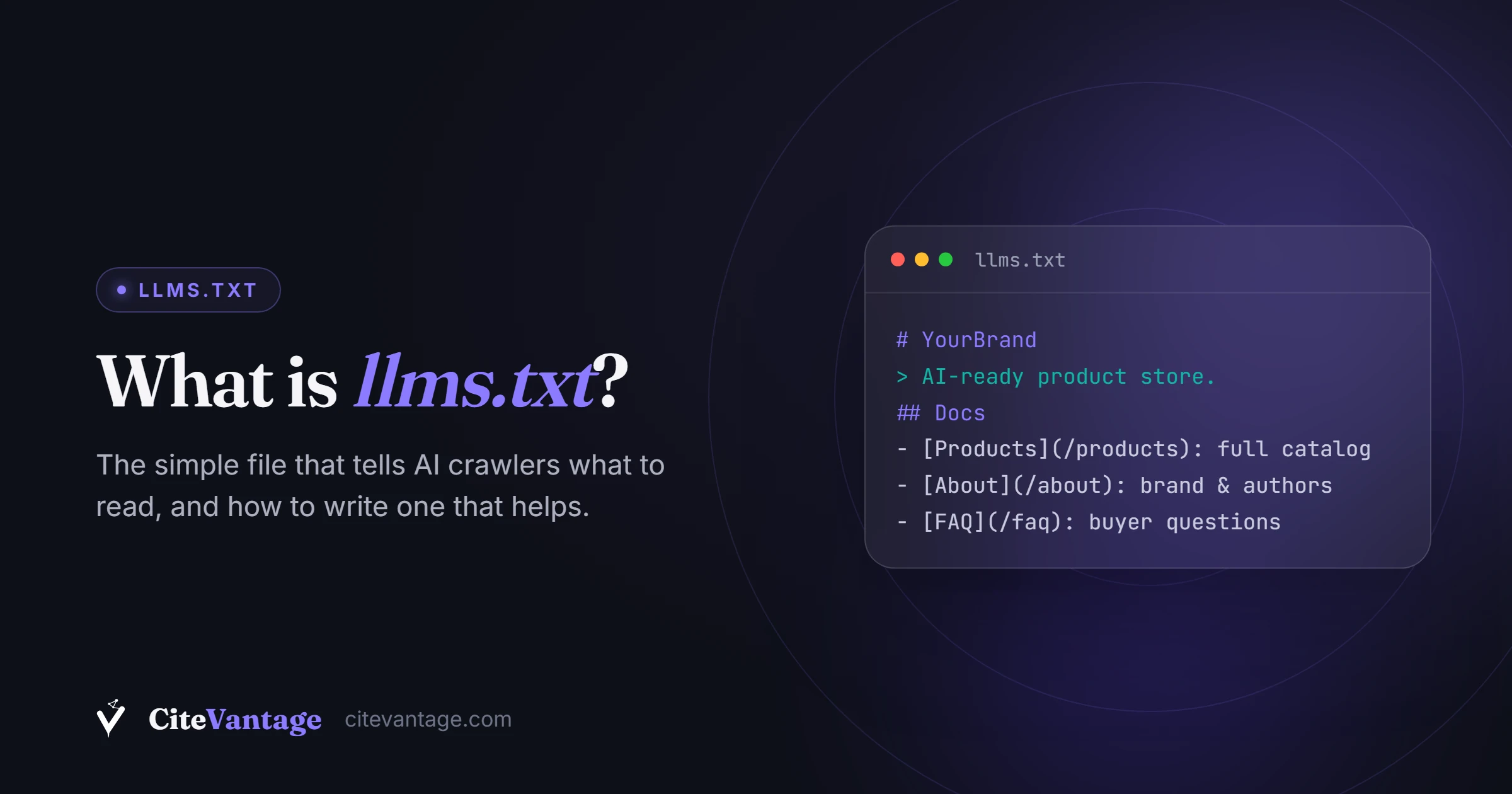
llms.txt is a plain markdown file placed at the root of a website (yoursite.com/llms.txt) that gives AI systems a short summary of the site and a curated list of its most important pages. It was proposed by Jeremy Howard of Answer.AI in September 2024. It is a proposed standard, not yet officially adopted by any major AI provider.
llms.txt in 50 words: A markdown file at your site’s root that tells AI models what your site is and which pages matter. One H1, a summary and organized link lists. Proposed in September 2024, adopted by many documentation platforms, but no AI engine has confirmed using it. Cheap insurance, not a ranking lever.
We add llms.txt to client sites in most of our GEO sprints, and we serve one ourselves at citevantage.com/llms.txt. We also tell every client the same thing before we do it: this file takes 20 minutes, costs nothing, and there is no proof it moves citations today. This guide explains what the file is, how to build one properly, and exactly how much weight to give it.
What is llms.txt exactly?
llms.txt is a text file written in markdown. Markdown is a simple way of formatting text with plain characters: a # makes a heading, a > makes a quote, and [text](url) makes a link. AI models read markdown very well because it is clean text with clear structure and no code clutter.
The file lives in your site’s root directory. The root directory is the top level of your website, the same place robots.txt lives. If your site is example.com, the file must load at example.com/llms.txt. Not in a subfolder, not on a CDN link. The root, so any system that looks for it knows exactly where to find it.
The idea behind it is a real problem. Web pages are built for humans and browsers. They carry navigation menus, cookie banners, scripts, ads and layout code. When an AI model fetches a page, it has to dig the actual content out of all that noise, and models have limited context windows (a cap on how much text they can read at once). llms.txt hands the model a clean version: here is what this site is, here are the pages that matter, go read these.
The official spec at llmstxt.org defines a simple format:
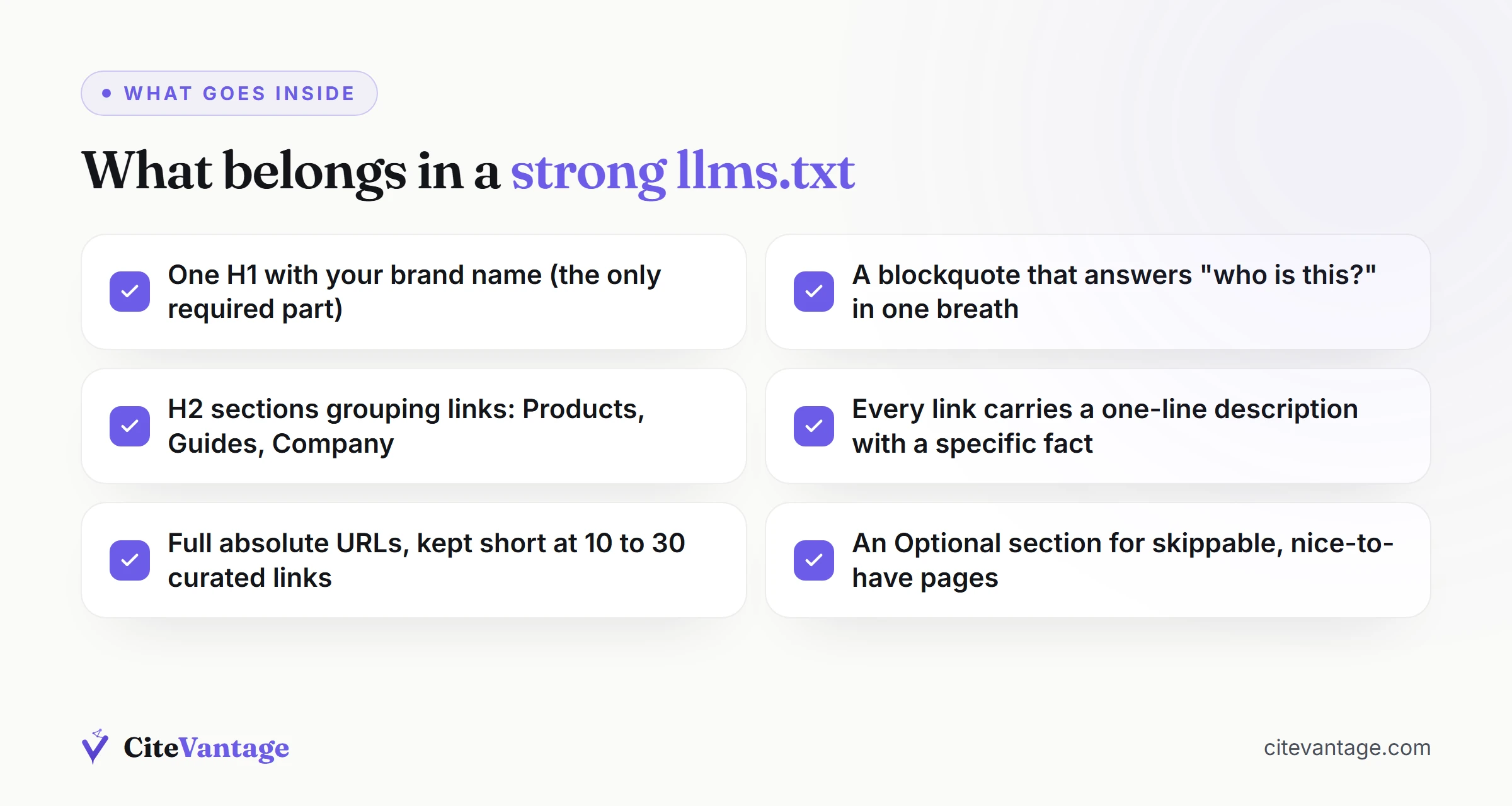
- One H1 heading with the site or project name. This is the only required part.
- A blockquote with a one-paragraph summary of the site.
- H2 sections, each containing a list of links with a one-line description per link.
- An optional final section called “Optional” for secondary pages an AI can skip when short on room.
That is the whole standard. No code, no special syntax, no tooling required.
Who created llms.txt and why?
Jeremy Howard, co-founder of the AI research lab Answer.AI (and creator of the fast.ai courses), published the proposal on September 3, 2024. His argument was practical: AI assistants increasingly rely on website content to answer questions, but HTML pages are bloated and context windows are small. A standard, model-friendly index file would help both sides.
The proposal spread fastest in the developer world. Mintlify, a documentation platform, added automatic llms.txt generation for the sites it hosts in November 2024, which switched on the file for thousands of developer documentation sites in one move. Anthropic (the company behind Claude) serves both llms.txt and llms-full.txt for its own documentation. Companies like Cloudflare, Zapier and Perplexity publish the file for their docs too.
Notice the pattern in that list. Adoption is strongest among sites publishing for developers and AI tools, where a human might literally paste the llms.txt URL into a chatbot to load context. Adoption on ordinary business and ecommerce sites is thinner, and that gap matters when we get to the evidence section below.
What does llms.txt actually do?
On its own, the file does exactly one thing: it sits at your root and waits to be read. No engine is obliged to fetch it, and none of the major ones has committed to doing so. What it is designed to enable, if an engine chooses to read it, is this:
- Give AI crawlers a shortcut. AI crawlers are automated programs that visit websites to collect content, the same way Googlebot does for Google. The known AI crawlers include GPTBot and OAI-SearchBot (OpenAI), ClaudeBot (Anthropic), PerplexityBot (Perplexity), and Google-Extended (Google). In theory, any of them could fetch llms.txt to understand your site quickly.
- Feed AI tools that ask for it. Some developer tools, coding assistants, and AI agents let a user point them at an llms.txt URL to load a site’s content as context. This works today, because a human or a tool is deliberately fetching the file.
- Curate your own story. You choose which pages represent you. Without the file, a model samples whatever it happens to crawl. With it, your best guides, your product pages, and your policies are listed in one clean place with your own descriptions.
What it does not do: it does not block crawlers, it does not control training, it does not add structured data, and it carries no confirmed ranking or citation weight in ChatGPT, Perplexity, Google AI Overviews or Gemini. It is an offer, not a rule.
How is llms.txt different from robots.txt and sitemap.xml?
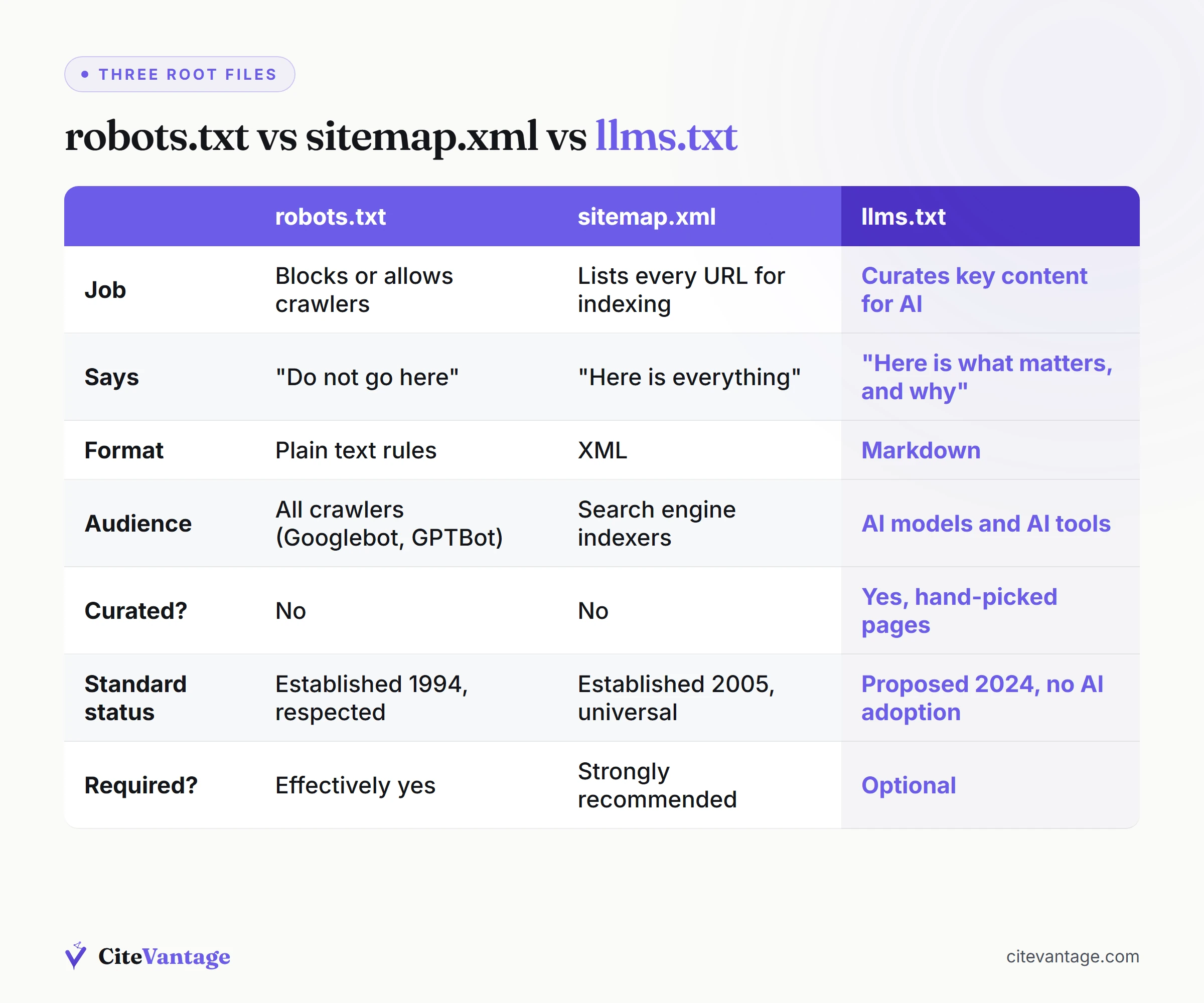
These three files all live at your root and all talk to machines, so they get confused constantly. They do three different jobs: robots.txt grants or denies access, sitemap.xml lists every URL you want crawled, and llms.txt proposes which pages matter and what they mean. Only the first two are standards.
Pro tip: Write every entry as a real markdown link,
- [Page name](https://example.com/page): what it covers. We shipped a version with bare URLs and Google PageSpeed reported the file as containing no links at all, because the parser reads markdown link syntax rather than raw text.
| robots.txt | sitemap.xml | llms.txt | |
|---|---|---|---|
| Job | Blocks or allows crawlers | Lists every URL for indexing | Curates key content for AI |
| Says | ”Do not go here" | "Here is everything" | "Here is what matters, and why” |
| Format | Plain text rules | XML | Markdown |
| Audience | All crawlers (Googlebot, GPTBot, etc.) | Search engine indexers | AI models and AI tools |
| Curated? | No | No | Yes, hand-picked pages with descriptions |
| Standard status | Established since 1994, universally respected | Established since 2005, universally used | Proposed 2024, no official AI adoption |
| Required? | Effectively yes | Strongly recommended | Optional |
The simplest way to hold it in your head: robots.txt is a lock, sitemap.xml is a phone book, llms.txt is a welcome brochure.
One important consequence: llms.txt is not a privacy or permission tool. If you want to stop GPTBot or ClaudeBot from reading your site, that job belongs to robots.txt. And if you want AI citations, make sure you are not blocking those crawlers by accident. We audit sites every month that block AI crawlers at the firewall without knowing it, which removes them from AI answers entirely. That access check is part of generative engine optimization, the wider discipline this file belongs to.
What does a real llms.txt example look like?
Here is a complete llms.txt modeled on a small ecommerce store. Swap in your own brand, pages and descriptions and this is production-ready. The format is plain Markdown: an H1 with your brand name, an optional blockquote summary, then H2 sections holding links with a short description after each one.
# Maple & Wick

> Maple & Wick is a small-batch soy candle store based in Portland,
> Oregon. We hand-pour non-toxic soy wax candles with cotton wicks,
> ship across the US, and publish practical guides on candle safety,
> burn times, and scent pairing.

## Products

- [All Candles](https://mapleandwick.com/collections/all): Full catalog
  of 24 soy candle scents, $18 to $42.
- [Best Sellers](https://mapleandwick.com/collections/best-sellers):
  Our five most-ordered candles, updated monthly.
- [Gift Sets](https://mapleandwick.com/collections/gift-sets): Bundled
  sets with free gift wrapping.

## Guides

- [Soy vs Paraffin Wax: Honest Comparison](https://mapleandwick.com/blogs/guides/soy-vs-paraffin):
  Burn time, soot, and safety data for both wax types.
- [How Long Do Soy Candles Last?](https://mapleandwick.com/blogs/guides/soy-candle-burn-time):
  Burn-time table by candle size, with care tips.
- [Candle Safety at Home](https://mapleandwick.com/blogs/guides/candle-safety):
  Placement, wick trimming, and pet-safe scent list.

## Company

- [About Us](https://mapleandwick.com/pages/about): Founded 2021,
  two-person team, all candles poured in-house.
- [Shipping & Returns](https://mapleandwick.com/pages/shipping):
  US-wide shipping, 30-day return policy.

## Optional

- [Press Mentions](https://mapleandwick.com/pages/press): Coverage in
  Portland Monthly and Apartment Therapy.
A few things this example gets right, and most llms.txt files get wrong:
- The blockquote answers “who is this?” in one breath. What you sell, where you are, what makes you credible. An AI reading only that paragraph could describe the store accurately.
- Every link has a description with specifics. Prices, counts, dates. Specific facts are what AI answers are built from.
- It is short. This is a curated index, not a second sitemap. Ten to thirty links is plenty for a small site. Dumping 500 URLs into the file defeats its purpose.
- The guides section leads with question-shaped content. The same answer-first pages that win citations on their own merit, as we cover in how to get cited by ChatGPT.
For a live agency example, our own file is public at citevantage.com/llms.txt. Copy the structure freely.
What is llms-full.txt?
llms-full.txt is the expanded companion file. Where llms.txt is an index (summary plus links), llms-full.txt contains the full text of your key pages, converted to markdown, in one large file. The point is to let an AI read your whole site’s substance in a single fetch, with no crawling at all.
Documentation sites use it heavily. Anthropic publishes an llms-full.txt containing its entire docs content, and developers paste it into AI tools to load complete context. For a documentation site, that is a genuinely useful product feature.
For a typical ecommerce or service site, we consider llms-full.txt optional. Product catalogs change too often to maintain a full-text mirror by hand, and the file can grow past what most models will read anyway. Start with llms.txt. Add llms-full.txt only if you have a stable body of guide content and a way to regenerate the file automatically.
How do you create an llms.txt file? (Step by step)
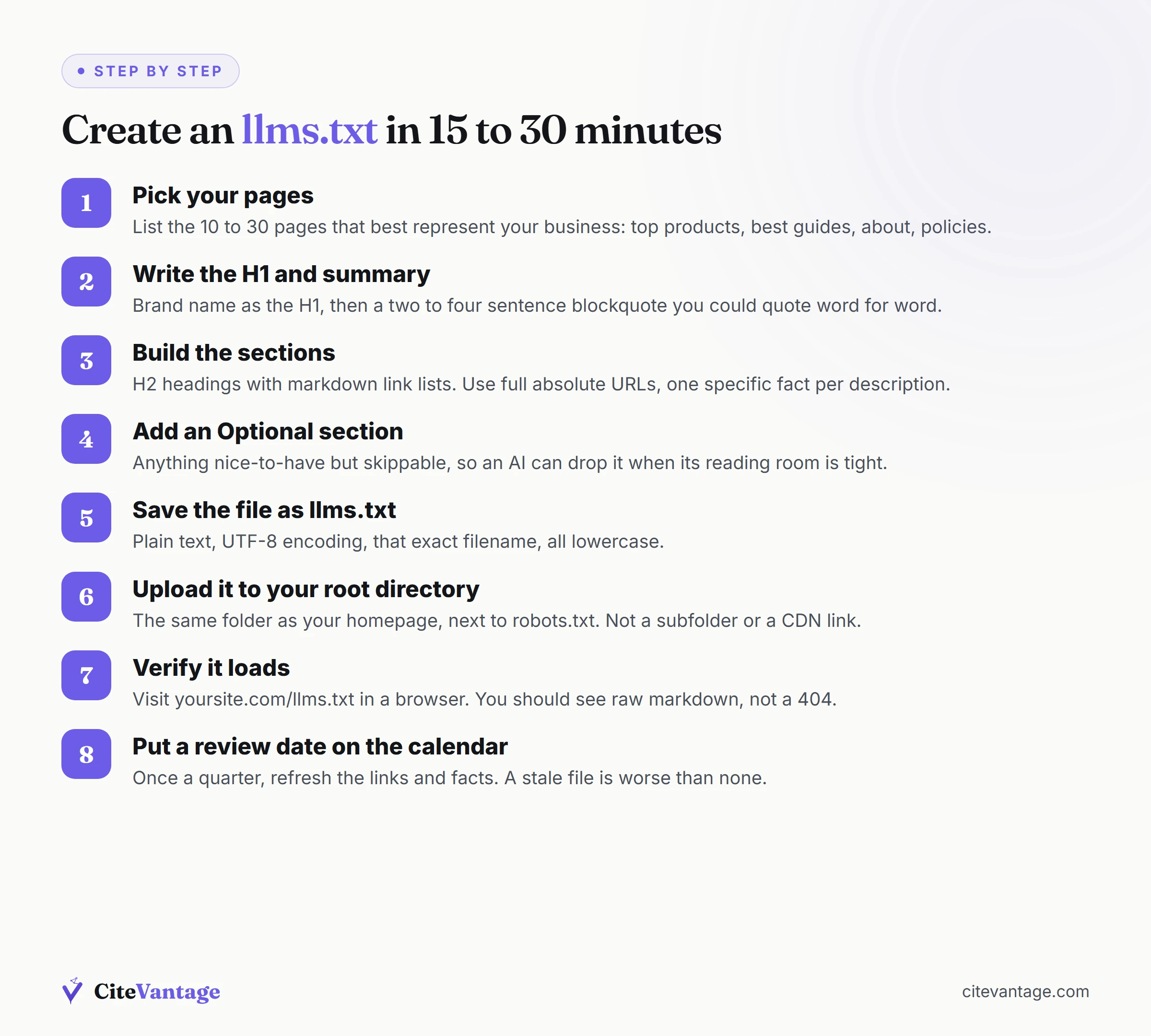
The whole process takes 15 to 30 minutes for a small site. You are writing a plain text file by hand rather than generating one: pick the pages that answer real buyer questions, write one honest sentence about each, and upload it to your root. The steps below do exactly that.
- Pick your pages. List the 10 to 30 pages that best represent your business: your top products or collections, your best guides, your about page, and your policy pages. If a page would embarrass you as the only thing an AI ever read about you, leave it out.
- Write the H1 and summary. Open any plain text editor. First line:
# Your Brand Name. Then a blockquote (a line starting with>) of two to four sentences saying what you sell, who you serve, and one credibility fact. Write it so it could be quoted word for word. - Build the sections. Add H2 headings (
## Products,## Guides,## Company) and under each, a markdown link list. Format:- [Page Title](full URL): one-line description with a specific fact.Use full absolute URLs, not relative paths. - Add an Optional section if needed. Anything nice-to-have but skippable goes under
## Optional. Per the spec, this signals content an AI can drop when its reading room is tight. - Save the file as llms.txt. Plain text, UTF-8 encoding, exactly that filename, all lowercase.
- Upload it to your root directory. On most hosts this means placing the file in the same folder as your homepage, next to robots.txt. On WordPress, upload to the site root via your host’s file manager, or use one of the several plugins that generate the file.
- Verify it loads. Visit yoursite.com/llms.txt in a browser. You should see your raw markdown as plain text. If you get a 404, the file is in the wrong folder.
- Put a review date on your calendar. Once a quarter, update the links and facts. A stale llms.txt pointing at dead pages is worse than none.
There are free llms.txt generators (Mintlify’s, Firecrawl’s, several WordPress plugins) that draft the file from your sitemap. They are fine starting points, but edit the output. The value of the file is curation, and a machine-generated dump of every URL is not curated.
How do you set up llms.txt on Shopify or WooCommerce?
WooCommerce is easy because WooCommerce runs on WordPress, and WordPress gives you root access. Upload llms.txt via your host’s file manager or FTP, or use an llms.txt plugin from the WordPress directory. Shopify is harder, because Shopify does not give you write access to the domain root, so the workarounds below are the realistic options.
Shopify is awkward. Shopify does not let you upload arbitrary files to your store’s root directory. Files you upload through Shopify’s admin go to Shopify’s CDN under a different URL, which does not count. Your realistic options:
- Use a Shopify app. Several apps in the Shopify App Store serve an llms.txt at the correct root path through Shopify’s app proxy system. Search the app store for “llms.txt” and check recent reviews before installing.
- Check whether it already exists. Platforms keep adding AI-related files natively, so visit yourstore.com/llms.txt before building anything.
- Skip it for now. Honestly a defensible choice on Shopify. The engineering workaround costs more than the unproven benefit, and your effort is better spent on the product-page structure, structured data, and answer-first collections content matters far more. That on-page work is what moved the needle in our RIPT Apparel case study, not a root file.
Whatever you do, do not pay a meaningful monthly fee just to serve this one static file.
Does llms.txt actually work in 2026?
Here is the honest answer, and it is the section most guides skip. No major AI engine has publicly confirmed that it reads llms.txt, and the independent tests published so far have not found evidence that adding one changes whether you get cited. What follows is what is actually known.
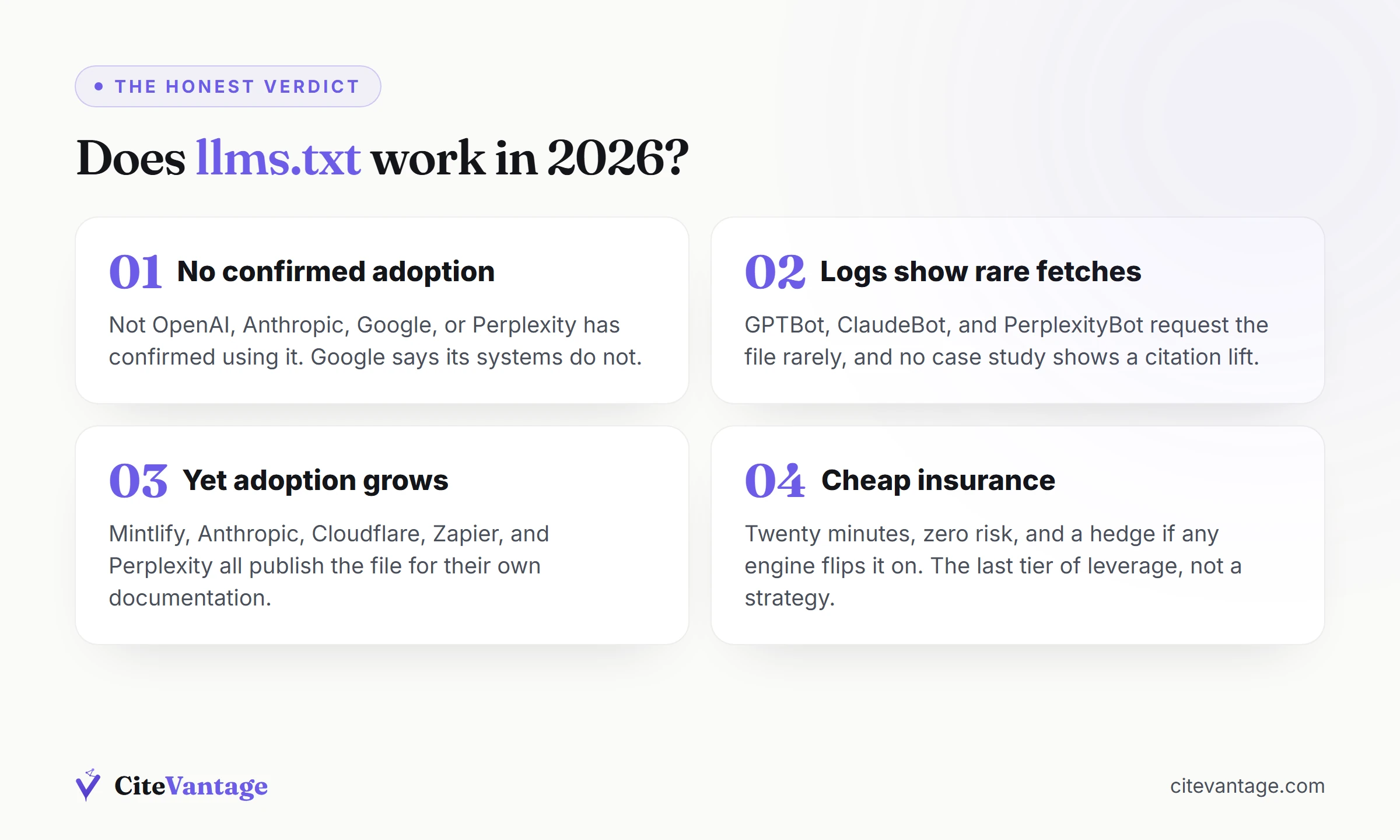
No AI provider has officially confirmed using llms.txt. Not OpenAI, not Anthropic, not Google, not Perplexity. The file is a proposed standard waiting for adoption that has not formally arrived. Google has been the most direct: its search team has said Google’s systems do not use llms.txt, John Mueller publicly compared it to the old keywords meta tag (a signal engines learned to ignore because site owners controlled it), and Google’s own AI optimization guidance tells site owners they do not need it for AI Overviews or Gemini.
Server logs back that up. Multiple independent analyses of site logs through 2025 and 2026 found that GPTBot, ClaudeBot, and PerplexityBot request llms.txt files rarely, and there is no public case study showing a measurable citation lift from adding one. In our own client re-audits, we have never attributed a citation gain to llms.txt alone, and we say so in our reports.
And yet adoption keeps growing. Mintlify generates the file for thousands of docs sites. Anthropic, Cloudflare, Zapier and Perplexity publish it for their own documentation. Directories track thousands of live llms.txt files. Why would sophisticated companies bother?
Three reasons, and they are the same reasons we still deploy it:
- It costs almost nothing. Twenty minutes and zero risk. There is no penalty for having the file, no downside beyond the maintenance minute per quarter.
- It works today for pull-based use. When a person or an AI agent deliberately loads your llms.txt into a tool, the file does its job right now. That use case is real, just niche.
- It is a hedge on adoption. If any major engine flips it on, the sites with clean files in place win day one. Standards have flipped from ignored to expected before. robots.txt itself started as an informal convention.
So our verdict, stated plainly: llms.txt is cheap insurance, not a citation strategy. In Answer Engine Optimization (AEO) terms, it sits in the last tier of leverage, behind answer-first content, AI crawler access, freshness, structured data and earned mentions. Those five move AI visibility now, on every engine from ChatGPT to Google AI Overviews. Structured data is not a single lever either, and our guide on which schema types matter for AI search sorts the types that verify facts AI cannot guess from the ones that are just hygiene. If a vendor is selling llms.txt as the secret to AI rankings, close the tab.
Should you add llms.txt to your site?
Yes, if the higher-leverage work is done or being done. It costs half an hour, it cannot hurt you, and it is trivially reversible, which is a different argument from saying that it works. What it should never do is displace crawler access, schema or earned citations. Our priority order looks like this:
- Answer-first content that resolves real buyer questions.
- Crawler access verified for GPTBot, OAI-SearchBot, ClaudeBot and PerplexityBot in robots.txt and at the firewall.
- Fresh, regularly updated key pages.
- Structured data plus the same facts in visible text.
- Earned third-party mentions.
- Then llms.txt, in the 20 spare minutes.
The file is a legitimate finishing touch on a site that is already extractable and crawlable. It is a distraction on a site that is not. Every full GEO engagement we run through our services includes it, in exactly that position.
Find out what AI engines actually say about you
Before adding any file, find out where you stand. Our free AI Visibility Audit runs your brand through ChatGPT, Perplexity, Google AI Overviews and Gemini against real buyer questions in your category, scores you 0 to 100, and shows exactly who gets cited instead of you.
From the 181 ecommerce brands we audited this year, 87% were invisible in AI answers about their own category. Most of them assumed a technical file would fix it. The audit shows what actually will.
Get your free AI Visibility Audit. Takes two minutes to request, and you get the citation gap map whether you work with us or not.
Frequently asked questions
What is llms.txt in simple terms?
+
llms.txt is a plain text file, written in markdown, that sits at the root of your website (yoursite.com/llms.txt). It gives AI systems like ChatGPT, Claude, and Perplexity a short, clean summary of what your site is about and links to your most important pages. It was proposed by Jeremy Howard of Answer.AI in September 2024 as a way to help AI read websites.
Is llms.txt the same as robots.txt?
+
No, they do opposite jobs. robots.txt tells crawlers which pages they may not visit. It is a set of rules. llms.txt does not block anything. It is a curated guide that says: here is who we are, and here are our best pages. robots.txt controls access, llms.txt offers a map. You can, and usually should, have both files on the same site.
Do AI engines like ChatGPT actually read llms.txt?
+
There is no official confirmation. As of mid 2026, no major AI provider (OpenAI, Anthropic, Google, Perplexity) has publicly committed to reading llms.txt, and Google has said its systems do not use it. Server logs across many sites show AI crawlers rarely fetch the file. It is a proposed standard, not an adopted one. Treat it as cheap insurance, not a citation lever.
How do I create an llms.txt file?
+
Write a markdown file with one H1 (your site name), a short blockquote summary, and H2 sections containing links to your key pages with one-line descriptions. Save it as llms.txt and upload it to your site's root directory so it loads at yoursite.com/llms.txt. The whole job takes 15 to 30 minutes for a small site. Our step-by-step section in this guide walks through it.
Do I need llms.txt for my Shopify store?
+
It is optional and low priority. Shopify does not let you upload files straight to the root directory, so you need an app or a workaround to serve one. If your answer-first content, crawler access, and structured data are already handled, adding llms.txt costs little and may help future tools. If those basics are not done, fix them first. A free AI visibility audit shows you which gaps actually matter.
What is llms-full.txt and how is it different from llms.txt?
+
llms.txt is a short index: a summary plus links. llms-full.txt is the expanded version that contains the full text of your key pages in one large markdown file, so an AI can read everything without visiting each page. Documentation sites like Anthropic's use both. For most ecommerce and service sites, llms.txt alone is enough to start.
More in AI SEO, GEO and AEO
- Domains AI Cites on Real Estate: The Open List
- Hostinger CDN Blocks GPTBot: HTTP 429 Case Study
- AI Search Statistics 2026: Sourced and Dated
- AI Tools for SEO and AEO: Track ChatGPT Mentions
- Best AI Mode SEO Analysis Tools for 2026
- Best AI SEO Agencies 2026: 15 Firms Ranked
- Can AI Crawlers Reach Your Site? How to Check
- GEO Case Studies: Successful Campaigns
- GEO vs SEO vs AEO: The Real Difference in 2026
- Generative Engine Optimization: GEO and AEO Guide
- Google Preferred Sources: Myths, Broken
- How to Check if ChatGPT Recommends Your Brand
- How to Get Cited by ChatGPT: 2026 Playbook
- How to Get Cited by Google Gemini
- How to Get Cited by Perplexity: 9 Source Signals
- How to Rank in Google AI Overviews: 2026 Guide
- How to Run an AI Visibility Audit Step by Step
- How to Track Competitors in AI Search Results
- Most Popular AI Visibility Tools for SEO
- SEO and GEO Strategy: Make Them Work Together
- Schema Markup for AI Search: Types That Matter
Start from the hub: AI SEO, GEO and AEO
See where AI is hiding your brand
Free multi-engine audit across ChatGPT, Gemini, Google AI & Perplexity.
See who AI names instead of me